Temporal Platform security features
For information about the general security habits of Temporal Technologies, see our trust page.
For information about Temporal Cloud security features, see our Cloud security page
The Temporal Platform is designed with security in mind, and there are many features that you can use to keep both the Platform itself and your user's data secure.
A secured Temporal Server has its network communication encrypted and has authentication and authorization protocols set up for API calls made to it. Without these, your server could be accessed by unwanted entities.
What is documented on this page are the built-in opt-in security measures that come with Temporal. However users may also choose to design their own security architecture with reverse proxies or run unsecured instances inside of a VPC environment.
Server Samples
The https://github.com/temporalio/samples-server repo offers two examples, which are further explained below:
- TLS: how to configure Transport Layer Security (TLS) to secure network communication with and within a Temporal Service.
- Authorizer: how to inject a low-level authorizer component that can control access to all API calls.
Encryption in transit with mTLS
Temporal supports Mutual Transport Layer Security (mTLS) as a way of encrypting network traffic between the services of a Temporal Service and also between application processes and a Temporal Service. Self-signed or properly minted certificates can be used for mTLS. mTLS is set in Temporal's TLS configuration. The configuration includes two sections such that intra-Temporal Service and external traffic can be encrypted with different sets of certificates and settings:
internode: Configuration for encrypting communication between nodes in the Temporal Service.frontend: Configuration for encrypting the Frontend's public endpoints.
A customized configuration can be passed using either the WithConfig or WithConfigLoader Server options.
See TLS configuration reference for more details.
Authentication
There are a few authentication protocols available to prevent unwanted access such as authentication of servers, clients, and users.
Servers
To prevent spoofing and MITM attacks you can specify the serverName in the client section of your respective mTLS configuration.
This enables established connections to authenticate the endpoint, ensuring that the server certificate presented to any connecting Client has the appropriate server name in its CN property.
It can be used for both internode and frontend endpoints.
More guidance on mTLS setup can be found in the samples-server repo and you can reach out to us for further guidance.
Client connections
To restrict a client's network access to Temporal Service endpoints you can limit it to clients with certificates issued by a specific Certificate Authority (CA).
Use the clientCAFiles/ clientCAData and requireClientAuth properties in both the internode and frontend sections of the mTLS configuration.
Users
To restrict access to specific users, authentication and authorization is performed through extensibility points and plugins as described in the Authorization section below.
Authorization
Information regarding Authorizer and ClaimMapper has been moved to another location.
Temporal offers two plugin interfaces for implementing API call authorization:
The authorization and claim mapping logic is customizable, making it available to a variety of use cases and identity schemes. When these are provided the frontend invokes the implementation of these interfaces before executing the requested operation.
See https://github.com/temporalio/samples-server/blob/main/extensibility/authorizer for a sample implementation.
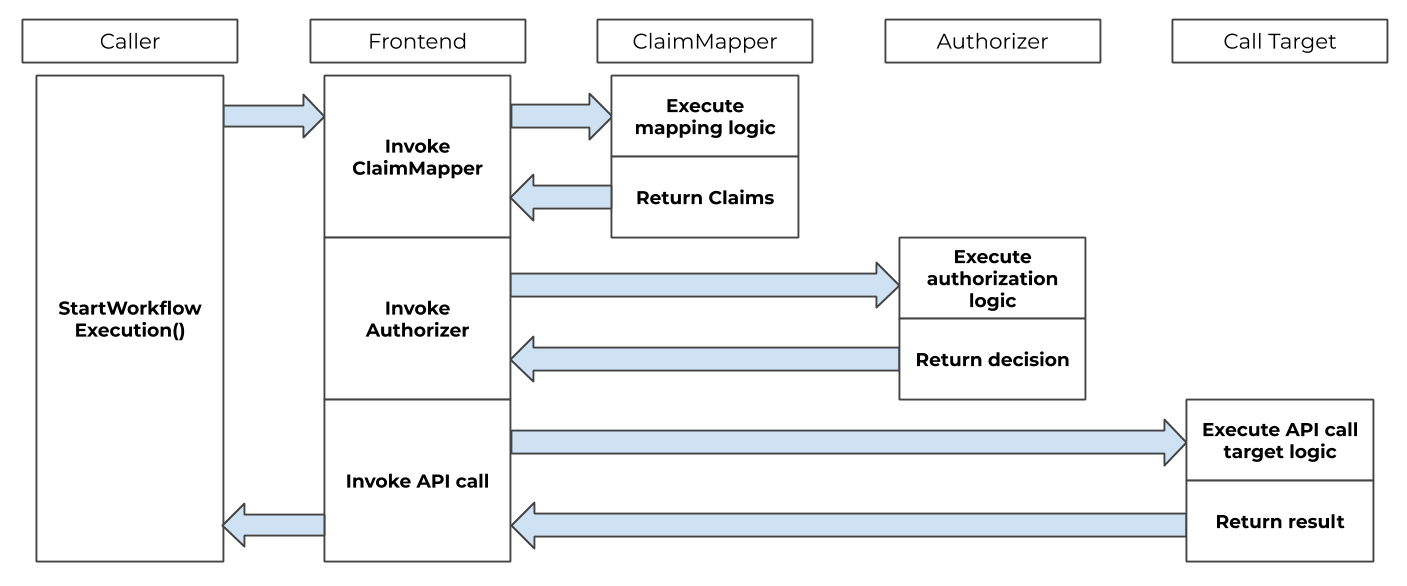
Front-end authorization order of operations
Single sign-on integration
Temporal can be integrated with a single sign-on (SSO) experience by using the ClaimMapper and Authorizer plugins.
The default JWT ClaimMapper implementation can be used as is or as a base for a custom implementation of a similar plugin.
Temporal UI
To enable SSO authentication in the Temporal UI using environment credentials, you need to configure the UI container with specific environment variables that define your identity provider and OAuth settings.
In your docker-compose.yaml, set TEMPORAL_AUTH_ENABLED=true to activate authentication.
Next, specify the required OAuth credentials and endpoints using environment variables such as:
TEMPORAL_AUTH_CLIENT_IDTEMPORAL_AUTH_CLIENT_SECRETTEMPORAL_AUTH_PROVIDER_URLTEMPORAL_AUTH_CALLBACK_URL
These values correspond to the client credentials and endpoints provided by your OAuth identity provider (such as Google, Auth0, Okta). When properly configured, Temporal UI will redirect users to your SSO login page and enforce authentication on access. This approach does not require any additional configuration files, making it ideal for containerized environments using secure environment variable injection.
temporal-ui:
  container_name: temporal-ui
  depends_on:
    - temporal
  environment:
    - TEMPORAL_GRPC_ENDPOINT=temporal:7233
    - TEMPORAL_ADDRESS=temporal:7233
    - TEMPORAL_AUTH_ENABLED=true
    - TEMPORAL_AUTH_PROVIDER_URL=https://example.com
    - TEMPORAL_AUTH_CLIENT_ID=xxxxxxxxxxxxxx
    - TEMPORAL_AUTH_CLIENT_SECRET=xxxxxxxxxxxxxx
    - TEMPORAL_AUTH_CALLBACK_URL=https://your-domain/auth/sso/callback
    - TEMPORAL_AUTH_SCOPES=openid profile email
  image: temporalio/ui:latest
  networks:
    - temporal-network
  ports:
    - 8080:8080
For more general guidance for configuration, refer to the Temporal UI README. For more details on configuration with Docker, refer to Temporal UI Config.
Temporal Service plugins
The Temporal Service supports some pluggable components.
What is a ClaimMapper Plugin?
The Claim Mapper component is a pluggable component that extracts Claims from JSON Web Tokens (JWTs).
This process is achieved with the method GetClaims, which translates AuthInfo structs from the caller into Claims about the caller's roles within Temporal.
A Role (within Temporal) is a bit mask that combines one or more of the role constants.
In the following example, the role is assigned constants that allow the caller to read and write information.
role := authorization.RoleReader | authorization.RoleWriter
GetClaims is customizable and can be modified with the temporal.WithClaimMapper server option.
Temporal also offers a default JWT ClaimMapper for your use.
A typical approach is for ClaimMapper to interpret custom Claims from a caller's JWT, such as membership in groups, and map them to Temporal roles for the user.
The subject information from the caller's mTLS certificate can also be a parameter in determining roles.
AuthInfo
AuthInfo is a struct that is passed to GetClaims. AuthInfo contains an authorization token extracted from the authorization header of the gRPC request.
AuthInfo includes a pointer to the pkix.Name struct.
This struct contains an x.509 Distinguished Name from the caller's mTLS certificate.
Claims
Claims is a struct that contains information about permission claims granted to the caller.
Authorizer assumes that the caller has been properly authenticated, and trusts the Claims when making an authorization decision.
Default JWT ClaimMapper
Temporal offers a default JWT ClaimMapper that extracts the information needed to form Temporal Claims.
This plugin requires a public key to validate digital signatures.
To get an instance of the default JWT ClaimMapper, call NewDefaultJWTClaimMapper and provide it with the following:
- a
TokenKeyProviderinstance - a
config.Authorizationpointer - a logger
The code for the default ClaimMapper can also be used to build a custom ClaimMapper.
Token key provider
A TokenKeyProvider obtains public keys from specified issuers' URIs that adhere to a specific format.
The default JWT ClaimMapper uses this component to obtain and refresh public keys over time.
Temporal provides a defaultTokenKeyProvider.
This component dynamically obtains public keys that follow the JWKS format.
It supports formats such as RSA and ECDSA.
provider := authorization.NewDefaultTokenKeyProvider(cfg, logger)
KeySourceURIs are the HTTP endpoints that return public keys of token issuers in the JWKS format.
RefreshInterval defines how frequently keys should be refreshed.
For example, Auth0 exposes endpoints such as https://YOUR_DOMAIN/.well-known/jwks.json.
By default, "permissions" is used to name the permissionsClaimName value.
Configure the plugin with config.Config.Global.Authorization.JWTKeyProvider.
JSON Web Token format
The default JWT ClaimMapper expects authorization tokens to be formatted as follows:
Bearer <token>
The Permissions Claim in the JWT Token is expected to be a collection of Individual Permission Claims. Each Individual Permission Claim must be formatted as follows:
<namespace> : <permission>
These permissions are then converted into Temporal roles for the caller. This can be one of Temporal's four values:
- read
- write
- worker
- admin
Multiple permissions for the same Namespace are overridden by the ClaimMapper.
Example of a payload for the default JWT ClaimMapper
{
   "permissions":[
      "temporal-system:read",
      "namespace1:write"
   ],
   "aud":[
      "audience"
   ],
   "exp":1630295722,
   "iss":"Issuer"
}
What is an Authorizer Plugin?
The Authorizer plugin contains a single Authorize method, which is invoked for each incoming API call.
Authorize receives information about the API call, along with the role and permission claims of the caller.
Authorizer allows for a wide range of authorization logic, including call target, role/permissions claims, and other data available to the system.
Configuration
The following arguments must be passed to Authorizer:
context.Context: General context of the call.authorization.Claims: Claims about the roles assigned to the caller. Its intended use is described in theClaimssection earlier on this page.authorization.CallTarget: Target of the API call.
Authorizer then returns one of two decisions:
DecisionDeny: the requested API call is not invoked and an error is returned to the caller.DecisionAllow: the requested API call is invoked.
If you do not explicitly configure an Authorizer, Temporal uses the default noopAuthorizer. This default allows every API request,
with no authentication or access control. Anyone who can reach your Temporal Server can invoke any API, including sensitive administrative operations.
This is not secure for production or for any environment that is accessible to untrusted clients (such as over the internet).
To protect your Temporal Server, you must configure an Authorizer plugin with a corresponding ClaimMapper. Without this, your deployment is
effectively open to anyone with network access.
Configure your Authorizer with the temporal.WithAuthorizer server option, and your ClaimMapper with
the temporal.WithClaimMapper server option.
temporalServer, err := temporal.NewServer(
	temporal.WithAuthorizer(newCustomAuthorizer()),
	temporal.WithClaimMapper(func(cfg *config.Config) authorization.ClaimMapper {
		return newCustomClaimMapper(cfg)
	}),
)
How to authorize SDK API calls
When authentication is enabled, you can authorize API calls made to the Frontend Service.
The Temporal Server expects an authorization gRPC header with an authorization token to be passed with API calls if requests authorization is configured.
Authorization Tokens may be provided to the Temporal Java SDK by implementing a io.temporal.authorization.AuthorizationTokenSupplier interface.
The implementation should be used to create io.temporal.authorization.AuthorizationGrpcMetadataProvider that may be configured on ServiceStub gRPC interceptors list.
The implementation is called for each SDK gRPC request and may supply dynamic tokens.
JWT
One of the token types that may be passed this way are JWT tokens. Temporal Server provides a default implementation of JWT authentication.
Example
AuthorizationTokenSupplier tokenSupplier =
  //your implementation of token supplier
  () -> "Bearer <Base64 url-encoded value of the token for default JWT ClaimMapper>";
WorkflowServiceStubsOptions serviceStubOptions =
  WorkflowServiceStubsOptions.newBuilder()
    //other service stub options
    .addGrpcMetadataProvider(new AuthorizationGrpcMetadataProvider(tokenSupplier))
    .build();
WorkflowServiceStubs service = WorkflowServiceStubs.newServiceStubs(serviceStubOptions);
WorkflowClient client = WorkflowClient.newInstance(service);
Related read:
What is a TokenProvider Plugin?
The Token Provider component is a pluggable component that attaches an authentication token to outbound cross-cluster RPCs.
Where the ClaimMapper and Authorizer plugins protect the receiving end of a request, TokenProvider protects the sending end.
When a Temporal Service replicates Workflows, Schedules, or Namespaces to a peer cluster, TokenProvider supplies the bearer token that the peer's ClaimMapper validates.
A typical approach pairs a JWT-emitting TokenProvider on the sender with the default JWT ClaimMapper on the receiver.
TokenProvider is a single-method interface:
type TokenProvider interface {
    GetToken(ctx context.Context, rpcAddress string) (token string, err error)
}
GetToken is called on every outbound cross-cluster RPC.
rpcAddress is the receiver cluster's host:port. Providers commonly use this value as the JWT's aud claim to scope each token to a specific receiver.
The Temporal Service does not cache the returned token.
Implementations are responsible for caching and refresh.
A provider that fetches tokens from an external service must cache internally, otherwise every outbound RPC triggers a network round-trip to that service.
OAuth 2.0 client libraries typically handle this caching, and a TokenProvider can often be a thin wrapper around one.
Required claims on the receiver
Cross-cluster RPCs target the receiver's AdminService, which the default Authorizer only admits with Claims{System: RoleAdmin}.
Tokens carrying lower roles are rejected.
With the default JWT ClaimMapper, the token must carry a permissions claim with the entry temporal-system:admin.
{
   "permissions":[
      "temporal-system:admin"
   ]
}
A custom ClaimMapper can recognize any JWT shape, such as an OAuth-style scp scope or a custom claim, and translate it into the same Claims{System: RoleAdmin} result.
Stream lifecycle
Cross-cluster replication runs over long-lived gRPC streams.
The token is attached when a stream is opened, and the receiver's ClaimMapper and Authorizer evaluate it at that point.
Already-open streams are not re-checked when the token later expires.
Rotation and revocation therefore only take effect when a stream is reestablished, for example after a reconnect or a process restart.
Transport security
auth.TokenCredentials requires transport security, so the gRPC runtime refuses to attach the credential to a plaintext dial.
Configuring WithTokenProvider therefore requires also configuring TLS for the destination, either through global.tls.remoteClusters in the YAML config or by passing a custom provider through temporal.WithTLSConfigFactory.
If WithTokenProvider is set but no remote-cluster TLS source is configured, the Temporal Service fails to boot with a directed error message.
This catches the misconfiguration at startup rather than on the first cross-cluster RPC.
Fail-closed mode
Set global.authorization.remoteClusterAuth.require: true to require a non-empty token on every outbound remote-cluster RPC.
When require is true, the Temporal Service refuses to start if no TokenProvider is configured, and the credential returns Unauthenticated rather than sending an empty authorization header.
Configuration
Configure your TokenProvider with the temporal.WithTokenProvider server option.
Pair it with the receiver-side plugins so peers validate what the sender attaches.
temporalServer, err := temporal.NewServer(
    temporal.WithTokenProvider(myTokenProvider),
    temporal.WithAuthorizer(authorization.NewDefaultAuthorizer()),
    temporal.WithClaimMapper(func(cfg *config.Config) authorization.ClaimMapper {
        logger := getYourLogger()
        return authorization.NewDefaultJWTClaimMapper(
            authorization.NewDefaultTokenKeyProvider(cfg, logger),
            cfg,
            logger,
        )
    }),
)
When TokenProvider is not configured, outbound cross-cluster RPCs carry no authorization header.
This is the default for deployments that don't replicate to peers, or that rely on transport-level (mTLS) authentication alone.
Data Converter
Each Temporal SDK provides a Data Converter that can be customized with a custom Payload Codec to encode and secure your data.
For details on what data can be encoded, how to secure it, and what to consider when using encryption, see Data encryption.
Codec Server
You can use a Codec Server with your custom Payload Codec to decode the data you see on your Web UI and CLI locally through remote endpoints. However, ensure that you consider all security implications of remote data encoding before using a Codec Server.
For details on how to set up a Codec Server, see Codec Server setup.
Configuration Options for Restricting and Securing Access
Temporal provides extensive configuration options to limit and control which callers can access your services and how those services behave in different environments. These options help you enforce stricter security boundaries in self-hosted deployments and tune behavior for production use cases. For more details on available settings and how to configure them, see the following references:
-
Cluster & Server configuration — Static configuration settings for servers and services.
-
Dynamic configuration — Runtime-updatable settings for tuning and behavior control.
-
Client environment configuration — Environment variable settings for configuring Temporal clients.